Monday, December 22, 2008

In the woods

This fall has been quite overwhelming. Being responsible for 33 location, 600 computers, listening to 700 employees and having only 1.3 people to help me out is quite a challenge. So part of the strategy is to be able to think of something else. And so will also this blog - which I will attempt to update a little more frequently. And I'll share this strategy with you.

It's about a cabin - or a "Hunting Castle" as my wife likes to call it.


What does this have to do with leadership strategies and computers? Well - if someone is to judge whether it is possible to have a socially independent, ecological home, who better than a techie?

Spending ever penny in the bank, we bought this without getting into debt. At all. This, by itself, was a first step that has long in the planning, and for which we have worked very hard. It was done this way for several reasons. First, it increases our independence and self reliance, hence enforces personal leadership. Second, it means we had to buy "bare bones", which in turn means we have greater freedom for our personal enhancements to the place. And third, it trained our patience.

It also has certain consequences. As I mentioned, being one of the cheaper houses we could buy means we have more work to do to get to the standard we want. This means further self training and self education. However, not being in debt also means that we can spend much more of our income to get to our goal faster. And indeed, there really aren't many excuses not to get things done anymore.

It will be an exciting new year!

Tuesday, September 30, 2008

Monday, September 29, 2008

How To Make Microsoft Cool Again

'The new commercial, titled "I'm a PC," goes straight at Apple's "Mac vs. PC" ads with a bunch of people (including Pharrell) claiming that they're PCs, implying that they're not actually lames like Apple says they are. While these new ads are better than the first bunch, we're still kinda confused.'

Wednesday, September 24, 2008

SecureClient messed me up

So I've been spending every spare moment the last couple of weeks trying to configure this new router, an SG580. When trying out the configuration, which should have been straight forward, strange things started to happen.

First, let me describe the layout. I have one leg on the administrative network, one leg on what will be the "IT Department network", and one leg on what will be a secure and clamped down zone. I have a managed switch on the IT segment to test with and a laptop on the secure zone. ICMP turned on everywhere.

From the secure zone, I could ping the switch and every interface on the router except ADM. Moving the laptop to the IT segment, I get the exact same results. However, placing it on ADM, I can easily access the switch in the IT segment and ping every interface on the SG.

The clue came when I wanted a thorough test and picked up another laptop, so that I could ping between all segments simultaneously. The other laptop was able to ping everything. Everyone were able to ping the other laptop - except mine. Mine would do it only when I was within the same subnet.

But my firewall was off - or wasn't it?

It then turned out that the culprit was Check Point's VPN-1 SecureClient. I don't know the internals of it, but it seems to have understood that I was no longer in my ordinary subnet and thereby assumed that the addresses I was trying to reach could only be done through VPN. It had tried to tell me so by offering to connect, but I had dismissed it and told me not to bother me again about it.

As soon as I removed the binding to SecureClient on the network interface, everything went swimmingly.

...and to think, the piece of software that sabotaged me was the one piece of software that was installed on my laptop on the day I started my new job...

Thursday, September 18, 2008

Wednesday, July 30, 2008

Clutter Free installs

There was a known problem with an undocumented solution. After reading the solution of a different, unrelated issue, I tried to use part of this to solve my first problem. It worked.

I'm not going to get into too many details, but the solution included a two step installation of an ODBC-driver before generating an ODBC source with the newly installed driver. The two steps of the installation was the loading a registry file and adding a directory to the global path.

I documented the installation in a MindMap file. And not just any MindMap file. I added it in a Clutter Free Enterprise configuration mind map, using three functions that did not yet exist: Registry, Path and ODBC.

Modifying large portions of the registry can look disgusting unless it's kept in a tree structure, so I added a branch in the MindMap for registry entries. Hence, the command "Registry ODBC Driver" will simply pick the "ODBC Driver" branch from the "Registry" tree, instead of having to list every single key/value pair as separate commands.

The "Path" function adds to the global Path environment variable in the registry and sends a message to all windows applications to reload the environment. This makes the change instant.

And finally, "ODBC" adds system DSNs by format "ODBC driver name;param=value;param=value" etc.

In combination with switches to automatically load this specific configuration file and run the specific solution before automatically quitting, allowed me to set up a shortcut for self help whenever someone new is lacking the driver and ODBC-source.

Wednesday, June 18, 2008

Problem parking

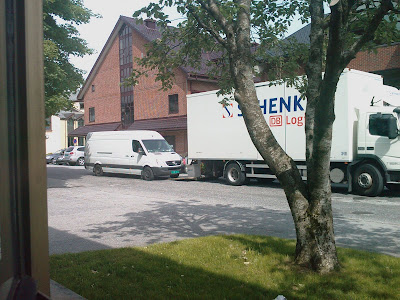
I'm eagerly waiting for our new desk for our new office, allowing the three of us to cooperate better. Every time a truck stops to deliver something, I peek outside. Coud it be our desk? No, not this time. Then it happens.

At the exact moment the unloading lift touched the ground, a van pulls up, partially on top of the lift, making it impossible for the trucker to unload or even raise the lift again. The van driver jumps out and runs away, leaving the trucker stuck, not able to do his work.


There is something awfully familiar about this situation. You work on one thing, then you get interrupted by someone who just wants your attention, but rendering you unable to do any constructive work until they are done with a job they don't really need your help to complete.

This can also be said about mess left behind on servers from various software installations. While you were planning something different, you suddenly find yourself cleaning up something that should never have been allowed to pile up in the first place. User profiles are typical victims of this phenomena, slowing down logons, eating up disk space and increasing backup sizes.

For this reason, I wrote a small piece of software to clean up some of the typical problem areas on a system. The original had references to specific problem areas on various servers in my old job. These references make no sense any other locations, so I reduced it to go for the typical problem areas on a stand alone computer.

This has already been used with great success in my new job, reducing the daily backup size to be reduced by 65 Gigabytes. I now have another year to introduce a new backup system, instead of one month.

This "reduced" version is available for free on my Trollsilm website, though I'm working on an Enterprise edition specifically to run smoothly on servers, taking only a few % of your CPU power. And best of all, it will be completely configurable to meet your organization's needs.