Wednesday, June 18, 2008

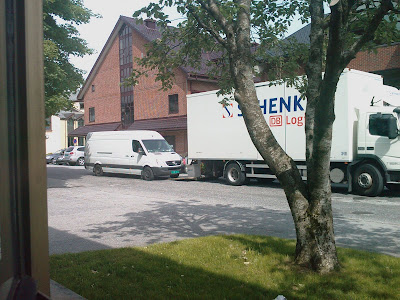
Problem parking

I'm eagerly waiting for our new desk for our new office, allowing the three of us to cooperate better. Every time a truck stops to deliver something, I peek outside. Coud it be our desk? No, not this time. Then it happens.

At the exact moment the unloading lift touched the ground, a van pulls up, partially on top of the lift, making it impossible for the trucker to unload or even raise the lift again. The van driver jumps out and runs away, leaving the trucker stuck, not able to do his work.


There is something awfully familiar about this situation. You work on one thing, then you get interrupted by someone who just wants your attention, but rendering you unable to do any constructive work until they are done with a job they don't really need your help to complete.

This can also be said about mess left behind on servers from various software installations. While you were planning something different, you suddenly find yourself cleaning up something that should never have been allowed to pile up in the first place. User profiles are typical victims of this phenomena, slowing down logons, eating up disk space and increasing backup sizes.

For this reason, I wrote a small piece of software to clean up some of the typical problem areas on a system. The original had references to specific problem areas on various servers in my old job. These references make no sense any other locations, so I reduced it to go for the typical problem areas on a stand alone computer.

This has already been used with great success in my new job, reducing the daily backup size to be reduced by 65 Gigabytes. I now have another year to introduce a new backup system, instead of one month.

This "reduced" version is available for free on my Trollsilm website, though I'm working on an Enterprise edition specifically to run smoothly on servers, taking only a few % of your CPU power. And best of all, it will be completely configurable to meet your organization's needs.

Friday, May 23, 2008

The One Good Thing About the Earthquake in China and Why I’ll Be Going to Hell

Being a geek, before stepping out of the house, I had to check my mail and then my server logs for any weird activity. Despite the regular patterns, there has been very little going on.

In fact, things have been very, very quiet the last few days.

A while ago, there was an article in The Economist about Steven P. Levitt, a statistician and co-author of a book titled "Freakonomics." Mr. Levitt had found odd things to compare and worked them out. For example, American cities where abortion was either illegal or expensive to be obtained, crime was found to be rampant. The opposite was also true. His assertion was that “Roe vs. Wade” was a cornerstone in the dip in crime in the United States as evidenced approximately seventeen years later (http://en.wikipedia.org/wiki/Roe_v._Wade).

I forget what the other patterns were, but of course his findings were received with hate, anger or accusations of racism and discrimination. Harsh truth usually has that impact on people living in the state of denial.

Regardless of whether these views are seen as a modern criticism of "what's wrong with society today and how we could try to fix it if we all just worked together," versus "having a view that touches a delicate subject that is different from what is considered acceptable; therefore, it is a form of discrimination," as any social worker will tell you, patterns between things do exist.

Not all are patterns are pleasant, which is why I'll be going to hell.

I'm deadly certain that the attention my machine receives from Chinese and Taiwanese computers is simply a coincidence. It's mostly bots from infected machines that probe the entire internet in search of weaknesses, open relays to send out spam and more poorly patched Microsoft SQL servers to infect.

I'm nobody special: I'm just one of many.

A quick search on the internet will yield similar discoveries by others. A quick example:

http://www.google.ca/search?hl=en&q=block+IP+ranges+china

Many IT administrators point out that scanning the culprit machines back yields evidence of infected machines, running illegal software, badly patched or with very little security measures in place. No wonder NIMBDA ran rampant there.

And, it seems, it's not that new of an event either. Check out the dates on these two examples:

http://www.theregister.co.uk/2005/08/31/blocking_chinese_ip_addresses/

http://www.businessweek.com/technology/content/may2004/tc20040517_1934_tc058.htm

Who is taking advantage of these machines? Through the Spamhaus' Rokso listing shows that the majority of active spammers are Canadian, American or Russian with a handful of Chinese (see: http://www.spamhaus.org/rokso/). Many of them operate hijacked servers in China.

That's how we get thousands of spam attempts a day, the daily handful of relay checks from Taiwan and the plethora of brute force attacks. Amusingly, just by blocking the IP ranges of Chinese ISP HINET.NET, I've cut down on attacks by 1/3rd, with the rest originating from anywhere else in the world (Russia and Turkey being very close seconds).

So, where's my pattern?

After the earthquake, suddenly everything malicious from the internet has dropped. I've had between one and three SSH attacks a day (versus one every minute).

I've had one or two spams a day. I don't mean one or two spams made it in my inbox. I mean one or two spams made it as far as talking to my mail server and were rejected before the transaction between the spammer and my mail server had gone past HELO.

Portsentry banned ONE host when they tripped on port 23, since the earthquake.

My old server is getting a bit of a break. Though it is debatable as to how long this bliss will last (hijacked computers in Russia and Turkey are picking up the pace with spam sending), positive patterns can be found everywhere. Even at the expense of 36,000 earthquake victims.

See you in hell.

Monday, April 14, 2008

ICT Leadership

Back in March, I wrote about strategic planning and last week about leadership as something that applies to all. Both of these items highlight that leadership is an attribute of how you work, while administration is part of the job. But administration without leadership is a recipe for disaster. And ICT adminisration without ICT leadership does not help you or the organization you're working for.

Not convinced?

You were most likely hired because you have the technical expertise to run the computer systems in your organization. Most likely, the chief executives do not have the technical knowledge you have, hence the most qualified person to make decisions related to the organization's ICT resources is you, not your superior.

Fine, you lead the way on the technology. You try to educate your superiors, so that they can make educated decisions. You might even start reading books about leadership and come across concepts like SWOT analysis and the 5 Cs of Core strategy, Consequence, Customer, Control and Culture, and you begin to wonder what this has to do with you. You're a technical assistance, not an executive.

But this all does matter even for you. You meet organizational culture every day, and you're part of defining it. You may try to control the direction of ICT development in the organization and educate your peers, or you might be running around to every person's bidding. Your peers are your customers, and their customers are the organization's customers. Everything you do have a consequence. To meet all of this, you must have a core strategy.

How about competition? You have to address competition on different levels: First, there's the competition of your organization. Then there's the competition of your ICT department. Even if you're a one man operation, you still have competition in the form of your job being outsourced to someone else or to a different organization to cut costs. At the same time, you still may have to outsource part of your operations in order to meet demands, in which case it is no longer competition, but a strategic partnership.

The difference between the two approaches to outsourcing lies in leadership.

Hopefully, you have bought into the concept that leadership is also about you, whether you officially have a hierarchy below you or not. The hierarchy is artificial, and leadership is not dependent on it. Leadership is about showing the way in the subjects that you have your compentency, yet you have to follow others in areas where they possess the compentency you lack.

Leadership is not something that you do only in your job, but it can also be applied to your life in general, from career development to personal life. After all, the one person who is most qualified to craft the life you want to live is you.


Because I'm moving to a new location, there will be no new article on Dihturnoaidi until May 19th. If you wish to contribute to Dihturnoaidi, get in touch at gard.abrahamsen at gmail

Monday, April 7, 2008

Are you leading, demanding or bending?

In my previous post, I barely touched the subject of leadership. From my experience, however, IT administrators are probably first in line to claim that they have noone to lead. Particularly in small organizations, where there there is nobody below them in the hierarchy. I disagree with this notion.

Everyone is a leader in one form or another. The IT Administrator's leadership is expressed through their knowledge of IT, and it is observed through people seeking assistance and direction from the IT Administrator. So even if you're not officially leading any people, you are still leading the way of the organization's use and knowledge of IT. Even when your superiors set policies, people will still be looking for you when they have problems that need to be solved.

Leadership is often confused with management and power. However, some of the most well known leaders were people with no power at all. Instead, they inspired people around them. The question is, how do we apply this in the IT world?

Let us have a look at the perpetually returning tech support questions of how to do something in Word. In my experience, the near-constant support to solving the same problems again and again does not inspire workers to learn. Instead, it inspires them to call you again. So the question is, how do you inspire someone to learn?

Since I, as most IT administrators, do not have any education in pedagogics, I'm uncertain if there really is a simple answer to that. After all, everyone are different and thus have different triggers and buttons. Learning these triggers and buttons, and then relate to them, is a key to inspiration. Which brings us back to the many attempted definitions of leadership.

Studies have shown that a common trait amongst the most successful leaders is constant learning. They learn about their fellow coworkers, about their business, about everything they touch. This knowledge is then expressed with an enthusiasm that inspires coworkers to follow their lead. They break new barriers and lead the way, the others follow.

But give this a little thought. If the leader's lead is based on information learned from coworkers, then everyone are actually part of the group's leadership. While it is mostly expressed by this one person, the leadership is more of a bidirectional relationship than a job in itself. Management, on the other hand, is an uninspiring job that behaves like sand in everyone's eyes if it is not coupled with leadership.

So stop being a manager now, and become your organization's IT Leader!

This article was inspired by the first 20 pages of The Leadership Manual by Hilarie Owen, Vicky Hodgson and Nigel Gazzard, ISBN 0-273-67551-6

Monday, March 31, 2008

This task has been delayed

I was going to write a post today, about how I get up at 6 AM to write these posts on Dihturnoaidi. But other things had to take priority, and so I find myself in a position where priority must be the article with... well... highest priority today.

There are many models of prioritizing tasks. As an employee, a "task processor" I used to do everything on a FIFO basis. Indeed, both my supriors and collegues were impressed by the hardwired FIFO-queue in my brain. But sometimes other tasks had to take priority anyway, breaking my scheme.

The more responsibility you have, the more you need to assess the priority of. I have tried many systems, ranging from inserting tasks in order of priority to booking time for each task, and eventually throwing some tasks out according to the four square important/urgent model.

Somehow, all efforts of planning your day tend to break from unexpected events and tasks. It will occur to you that cloning yourself wouldn't be such a bad idea. But actually, it is probably the worst idea ever. Just like computers and automation has added stress, so will other high performance as well. Allow me to explain.

Your highest priority is not always the most urgent task. Indeed, a lot of tasks, known as "fire extinguishing tasks", are a result of something else that has not been done to prevent these fires from occuring in the first place. Particularly in work places where IT has been forced upon unsuspecting computer illiterate employees, the greatest fire generator is the lack of training.

Running around extinguishing these fires is a tripple mistake. First, you don't get time to address the real problem that causes these fires. And second, employees get accustomed to this mode of operation and will resist the changes required to stop these fires from occuring. This is particularly true when lack of training is the main source of fires.

The third reason it is a mistake to extinguish all these fires is, indeed, your own health. Make no mistake. Your health is, and must be, your highest priority. It is easy to dive into the job, head first, wanting to show off your fantastic skills at problem solving. However, if every day is flooded with time sensitive tasks, a lot of which will never get done anyway, you will run out of fuel. And who will be doing your job then?

Of course, bumping a task till later might upset some people, particularly when they feel that their task is the most important in the organization. Some will even claim to know your job better than you do, because they already have "the solution". This solution usually includes them getting more rights than they should have. Take a deep breath and realize that they are not seeing the full picture, that you're the one who does, and you're the one who is in charge of the IT resources. Do your job, and do what you know is right.

In conclusion, what could possibly be more important than keeping my monday schedule for Dihturnoaidi? Well, family, of course!

Monday, March 24, 2008

Monday, March 17, 2008

E-mail: Keep it simple, stupid!

The mere size of our e-mail boxes tend to overwhelm anyone who sees them. Recently, a friend of mine apologized for being a day behind on his introduction to an online group project, citing some 1600 e-mails in his inbox as the main reason. I can relate. My mailbox used to be this way, too.

But not anymore. I have implemented the principles of kiss, that is to Keep It Simple, Stupid. There are several ways of handling e-mail, going to extremes in all directions. The most extreme is Inbox Heaven, advocating an empty mailbox and semi-constant checking. There's also the consolidation of e-mail boxes and a question of how extreme this consolidation should be. I believe it is impossible to prescribe a set of accurate rules, as the environment and method used to achieve your best performance is very subjective.


E-mail is intrusive on your workflow

I have implemented what I consider the best of all practices that fits me. For my own policy, I have not only considered an efficient handling of e-mail, but I have also carefully considered my priorities and made sure that my inbox does not interfere with my work.

When I had a cubicle job, one of my pet peeves was managers who kept dropping by my cubicle, taking my attention away from my work. Having to adjust to the new subject at hand took time and energy, as did adjusting back to what I was doing in the first place. It's like driving down the highway at 90 mph and get a phone call that demands that you read some paper you have stored in your briefcase to comment on a different project. You pull over, grab your briefcase, read the document, comment on it, and then you have to wait for a chance to merge into the traffic again. Repeat every ten minutes and your main project, driving from A to B, suddenly takes a lot longer time, and you also find out that you're spending more time starting and stopping the car than actually driving or even commenting. And this is the reason why big bosses have secretaries who keep track of appointments.

The e-mail inbox and its constant reminders have the exact same effect on your attention as those unwanted interruptive visits in your office. While the IT administrator usually can only dream of having his/her own secretary to keep the visitors to appointed schedules, we can at least do something about the nearly constant stream of e-mails: Have an appointment scheduled for your e-mail.

Seriously! E-mail is a form of letter, not an "instant message". Sending an e-mail to someone is like putting a note in their paper inbox, except it is now electronic. You get to it when you get to it.

If you have a habit of answering e-mails immediately, you inadvertently create the expectation that you will respond to the sender's problem immediately, maintaining the intrusive practice on your attention.

I read my e-mail inbox only three times a day: At 8.45 after my morning administrative tasks, at 12:30 after lunch and at 15:45 before closing down the office for the day. I'm considering to reduce this to only the morning and lunch check. After all, reading about people's problems before leaving work will only keep my mind busy at night, when I'm supposed to give attention to my family. This is wasted energy, as the people with problems have taken the day off, too, and will not be reading your response until the next morning anyway.


Other employees will adapt

Realizing that e-mail is, indeed, slow delivery of messages, other employees will eventually adapt to your regime. Within a couple of weeks of implementing this, they will learn to differentiate between sending an e-mail for simple stuff where they do not require an immediate response, and calling your office when they need something urgently.

And even with the urgent stuff, they learn that you do not live in your inbox. And the reason you do not live in your inbox is that you have actual work to do. This, in turn, has the effect that they come knocking on your door only if they really have to.

When I first implemented my new e-mail regime, I thought there would be a very slow learning curve for the other employees. I was pleasantly surprised to see that they learned the new practice a lot faster than the half year I had expected. Only a week after I started to do this, I stopped receiving e-mails that needed urgent responses.

To my surprise, people learned to think more and ask less, reducing the number of phone calls about those pesky "grey boxes on the screen with text on it and I don't know what to do about it. Should I click yes or no?" "What does the text in the box read?" "It says: Are you sure you want this file?" "The computer is wondering if you want to delete the file." "Yes I do. So what do I answer?" "If you want to delete file, click yes. If want to keep the file, click no." "I want to delete it, do I click yes?" "Yes." "*click* Ah! The file was deleted! Thank you so much! What would I have done without you, man?" (This example is slightly exaggerated)


Your time is precious

One of the problems with technical support, is that you often end up doing another employees job because a) you actually know word processing, b) you type faster, and c) the employee is crammed for time and is too stressed about it to follow your attempt at teaching them.

However, your job is to adminster the IT resources. Doing other people's job means that the other employee gets some time off while you're reallocating your work time to be their substitute.

Consider this simple math: You get five calls every day because some employees have too little knowledge about the software they have to work with every day. Even though helping them only takes "five minutes," it usually takes at least ten anyway. In addition, you have to adjust your mind to their problem, so add another five minutes of adjusting your attention back and forth between your own work and their problem. That's fifteen minutes per call, or an hour fifteen minutes per day of lost productivity.

For your typical 7.5 hour work day (8 hours when you include lunch, but lunch is not included in effective work time), that's 16.67% of your time. So take 16.67% of your annual salary and multiply by 1.5 for administrative overhead surrounding your job, and you see the amount of money this actually costs your organization, and add another 25% for the employee trying to find out how to do their job before they called you. The number you end up with should be enough to convince your superiors to spend a little more effort on training employees.


Keep your answers short and simple

Keeping a clean inbox helps you focus on the important issues. Just like your todo-list, you need to finish off tasks, so that the list doesn't grow. And just like your todo-list, when you're done with something, you need to get it out of sight. Keeping only open issues in your inbox means that you spend less time searching for important e-mails regarding an open issue.

Hence, I subscribe to the policy that if anything takes less than two minutes to answer, I answer it immediately. With an already reduced inbox, there are not many e-mails that need this attention anyway.

E-mails that require a lengthy response I write down in my work schedule as an appointment. I consider these replies as "requiring a document to be written." Even if it is a support call that requires a lengthy response, writing it up as a work documents will save you time later, when others encounter the same problem. I respond to these e-mails with information about the appointment I have set up for their response. Actually sending the lengthy response is then also not really writing them an e-mail, but sending them documentation on the issue.

Items that require discussion should lead to discussion. Writing back and forth on an issue is unproductive. Unless you're on opposite sides of the planet, it is better to schedule an appointment for the discussion. The discussion may then very well end with written documentation on the decisions made and the reasoning behind them, but you have not spent days on end in your mailbox.

After this, the only thing left in my e-mail is advertising. Working in a public institution, there is spam, and there is advertising e-mail from people I actually have bought things from before. While spam is deleted, I browse the proper advertising to see if there is anything useful. This takes me about 10 seconds to determine. Afterwards, I move the advertisment to a special advertisment mailbox. When I actually need to buy something, I search this holding box for offers received the last year. This saves me time from calling around to find out where I can get it and how much it costs.


"Did you read my e-mail?"

Occationally, you will receive a phone call about that e-mail someone sent two minutes ago. To avoid this, set up a signature-file that explains your e-mail policy. It may very well be as simple as "I do not live in my inbox, as I have actual work to do. I check e-mail only twice a day: at 8.45 and 12:30. If your request is urgent, give me a call instead."

When I receive a call about that two minute old e-mail, the first thing I do is to tell them that I won't be reading that e-mail until 12:30 (or 8.45 the next morning). After all, why should I have read the e-mail when they ended up calling me because of its urgency anyway?


Summary

Your job is not to read and write e-mail all day. Turn off alerts and check your e-mail only 2-3 times per day and do this only when it does not interrupt your work in progress. Do not spend much time answering e-mails. Lengthy discussions should be done in proper discussion, not e-mail. Lengthy replies mean that you have to generate documentation.

Another employee's lack of required skills is the other employee's and the organization's problem and needs to be addressed. The proper response is for the employee to receive proper training at a scheduled hour when it does not interfere with other tasks.

Make sure people understand your e-mail policy and why you have it. They will adapt and you will get some actual work done.